Free downtime tracker for Excel and Google Sheets
A free sheet to track downtime
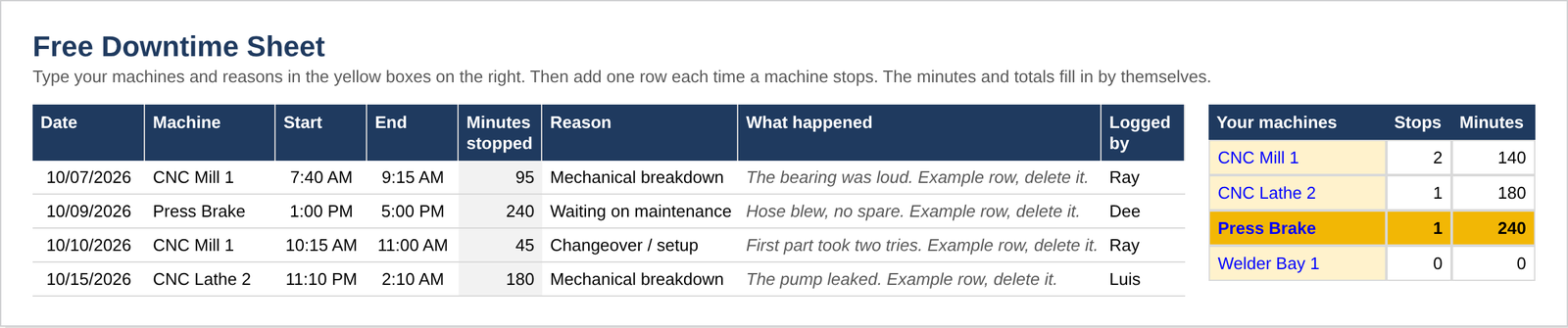
Write down each stop: the machine, when it stopped, when it ran again, and why. The sheet adds up the minutes by machine and by reason. The biggest one turns yellow.
Get the Free Downtime Sheet
Type your email. Gumroad sends you the file.
Free. Gumroad emails you the file right away. We never sell your email.
Works in Excel 2019 and up, and in Google Sheets.
What's in it
- A log for 500 stops: the date, the machine, start and end, the reason, what happened, and who logged it.
- The minutes figure themselves. A stop that runs past midnight still adds up right.
- Totals by machine and by reason. The biggest one turns yellow.
- Your own machines and reasons, picked from a list. Up to 20 machines and 12 reasons.
How to use it
- Type your machines in the yellow boxes. Then type your reasons.
- Each time a machine stops, add a row. Type the start and end times.
- Look at the yellow lines. Fix the biggest one first.
Free sheet or the $12 tracker?
The Downtime & OEE Tracker, $12
It shows the cost in dollars. A dashboard ranks your losses. It does OEE for up to 10 machines.
What do your stops cost? Try the downtime cost calculator. Want your OEE too? Try the OEE calculator. New to tracking? See what goes on a breakdown board, or what downtime really costs a small shop.